
Best Acapella Extractor for Producers: Online vs in Your DAW
The best acapella extractor depends on where you work. For a quick one-off, an online splitter like LALAL.ai or MVSEP. For the best free quality, Ultimate Vocal Remover. For producers, extracting inside the DAW saves the most time: Ableton Live Suite, Logic Pro and FL Studio split stems themselves, and Premix adds song search, key and BPM.
TL;DR: every modern extractor uses the same kind of AI model, so the vocal quality is closer than the marketing suggests. The real differences are cost, upload vs local, and how many steps it takes to get the vocal onto your grid in key.
Full disclosure: Low End Candy makes Premix ($39, Mac and Windows), so it is in this list. The rest are tools we would point a producer to anyway.
Online acapella extractors vs in your DAW: what is the difference?
An online extractor splits a file you upload on its servers and gives you the vocal back to download. An in-DAW extractor runs on your computer and puts the stems on tracks in your project. Online is quicker to start; in the DAW, the vocal is already where you need it.
| Online extractor | In your DAW | |
|---|---|---|
| Install | None | Your DAW or a plugin |
| Where the audio goes | Uploaded to a server | Stays on your computer (most tools) |
| Cost | Free tier, then per minute or a plan | Included in your DAW, or a one-time plugin |
| Getting it into a project | Download, import, warp, match the key | Lands on tracks in the session |
| Best for | One vocal, on any computer | Remixes and bootlegs you make often |
What is the best free acapella extractor?
Ultimate Vocal Remover (UVR) is the best free option for most producers: a free, open-source desktop app that runs models such as Demucs and MDX-Net on your own computer. Quality is excellent. The cost is setup: you install it, pick a model and wait while your computer works. Demucs itself, the open-source model from Meta's research team, is free too, if you are happy on the command line.
Which online acapella extractor is best?
For a one-off with no install, LALAL.ai and MVSEP are the usual picks; there are dozens of others built on the same open models. They are quick and work on any computer, including a laptop away from your studio. Check each one's current free limits and pricing before you upload a whole album, and remember the song goes to someone else's server.
Can you extract an acapella inside your DAW?
Yes, three big DAWs do it now:
- Ableton Live Suite 12.3 and later: right-click a clip and choose Separate Stems to New Audio Tracks. It runs locally and gives Vocals, Drums, Bass and Others (Ableton's release notes).
- Logic Pro 11 and later: Stem Splitter, on any audio region.
- FL Studio 21.2 and later: stem separation when you load audio into a channel or the playlist.
If your DAW has it, try it first: it is free and the vocal is already in your project.
Premix: the acapella, plus the song's key and BPM, in your DAW
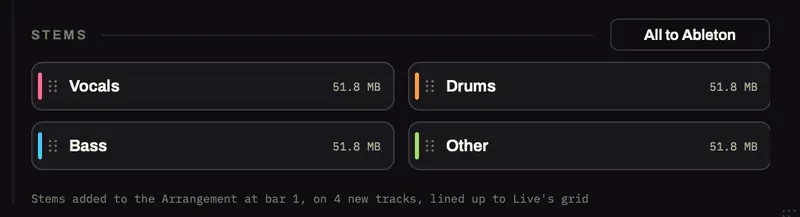
Premix is a VST3/AU plugin and app for producers who start a remix from a song rather than a file. You type the song's name (or import your own WAV, AIFF, FLAC, MP3 or M4A), and it reads the key with its Camelot code and the BPM, saves a 24-bit WAV and a 320 kbps MP3, and with Split into stems on, gives you Vocals, Drums, Bass and Other lined up from bar 1. In Ableton Live 12.0.5 and later it all lands in the set by itself and the set follows the song's tempo and key; in other DAWs you drag the song or stems to bar 1 at your project's tempo.
What to know before you buy:
- The split is free on an Apple Silicon Mac with macOS 14 or newer, after a one-time 2 GB engine install: about 20 seconds for a 3½-minute song on an M1 Pro. On Windows and Intel Macs it splits through your own LALAL.ai account.
- Searched songs are YouTube quality (usually around 128 kbps), fine for sketching and remix ideas. For the cleanest acapella, import a lossless file you own; Premix's Buy Full Quality shows where to buy the track.
- It needs the internet to search and download. The key, BPM and the free split run on your computer.
- $39 one-time, Mac and Windows, with a license key by email that is checked offline, and a 14-day money-back guarantee.
If all you ever need is one vocal from one song, your DAW's splitter or UVR is enough. Premix earns its place when you do this every week and want the song, the key, the BPM and the stems in one step.
Watch Premix take a song to a session in 3 minutes: https://youtu.be/ad3z2sjoR-4
How clean will the acapella be?
Very good on most modern pop and dance records, never perfect. Every extractor estimates the voice inside the mix, so expect a little bleed: a faint hi-hat, a ghost of the snare, some of the original reverb. A gate between phrases, a high-pass around 80 to 120 Hz and a de-esser for cymbal bleed fix most of it. The step-by-step cleanup is in how to get an acapella from any song.
Is it legal to use an extracted acapella?
For your own sessions, practice and DJ edits you play privately, extracting a vocal is common practice. If you release, sell or perform something built on someone else's vocal, you need permission from the rights holders, however you extracted it.
Which acapella extractor should you use?
| You want | Use |
|---|---|
| One vocal, no install, any computer | An online extractor (LALAL.ai, MVSEP) |
| The best free quality, and setup is fine | Ultimate Vocal Remover |
| Free, and your DAW already has it | Live Suite 12.3+, Logic Pro 11+, FL Studio 21.2+ |
| The song, its key and BPM, and all four stems on your grid | Premix |
| The cleanest possible vocal | An official acapella, if one exists |