
Best Reverse Reverb Plugins in 2026 (Free and Paid)
A reverse reverb plugin makes a reverb tail swell into a sound instead of trailing after it. In 2026 the real options are a dedicated real-time insert (Preverb, UnitedPlugins Mirror), a big creative reverb with a reverse mode (Eventide Blackhole, Baby Audio Crystalline), the free RVRSE, or the free bounce-and-reverse method that works in any DAW.
TL;DR: if you make swells often and want to keep editing the part, a real-time insert saves you a bounce every time something changes. If you need one swell, the free bounce method is fine. If you want a reverb for everything that also reverses, Blackhole or Crystalline.
Full disclosure: Low End Candy makes Preverb ($49, VST3/AU, Mac and Windows), so it is in this list. Everything below says what each option actually does, so you can pick the one that fits how you work.
Real-time vs bounce-and-reverse: what is the difference?
Bounce-and-reverse prints the effect to audio: you reverse the clip, add reverb, bounce it, reverse it again and line it up. A real-time plugin does the same job live on an insert, so the swell follows the part when you change a note, the length or the reverb.
| Real-time plugin | Bounce and reverse by hand | |
|---|---|---|
| Cost | $0 (RVRSE) to $99 | Free, any DAW |
| Steps per swell | Put it on the track | Reverse, add reverb, bounce, reverse, align |
| When the part changes | The swell follows it | Redo the whole chain |
| Pick the reverb | The plugin's own characters | Any reverb you own |
| Latency | Yes, compensated by the DAW (see below) | None, it is audio |
| Best for | Swells on every transition, parts still changing | A one-off swell, a favourite reverb |
How do you do reverse reverb without bouncing?
Use a plugin that builds the swell ahead of the sound live. A reverb cannot hear the future, so these plugins delay your audio by the length of the swell and report that delay to the DAW as latency. The DAW's delay compensation then moves everything back into place, and the swell lands in front of the transient with your clip still on the grid. Preverb and Mirror both work this way.
Can a reverse reverb plugin really work in real time? (latency)
Yes, on playback, with one catch: the reported latency equals the swell length, so it can be a second or more. That is invisible on a clip that is already recorded, because delay compensation lines it up. It is not usable on a track you are recording or monitoring live, where you would hear it late. For those, print the swell: Preverb's Capture renders it to a WAV you drag onto a track, with no latency.
Is there a free reverse reverb plugin?
Yes, two free routes. RVRSE is a free, open-source (MIT) plugin for VST3, AU and CLAP: you load a one-shot impact sample and it builds a reversed swoosh into it. Bedroom Producers Blog covered it in April 2026. It works from samples rather than reversing the reverb on a part you already have. The other free route is the manual bounce method, below.
Which DAW has reverse reverb built in?
None of the big ones has a single insert that swells before the sound. Reason has RewindVerb, but it is a Rack Extension, so it only loads in Reason. In Ableton Live, FL Studio and Logic Pro you do it by hand with the DAW's own reverse function and any reverb: here are the step-by-step guides for Ableton Live, FL Studio and Logic Pro.
Reverse reverb vs reverse delay: which do you want?
Reverse reverb is one smooth wash rising into the sound. Reverse delay is a run of reversed echoes that rush into it, so it is rhythmic. Many producers use both on the same transition. The full comparison is in reverse delay vs reverse reverb, and the plugins are in the best reverse delay plugins.
The options compared
Prices are list prices checked in October 2026; sales come and go.
| Option | How it reverses | Formats | Price |
|---|---|---|---|
| Preverb | Real-time insert, six reverb characters plus your own impulse response, Capture to WAV | VST3, AU · Mac + Windows | $49 |
| UnitedPlugins Mirror | "Reverse negative delay": reports latency so the DAW plays the reversed effect early | VST, VST3, AU, AAX | About $69 |
| Eventide Blackhole | A Gravity control that reverses the decay, inside a large creative reverb | VST, VST3, AU, AAX | $99 list |
| Baby Audio Crystalline | A Reverse switch in an everyday reverb, next to freeze and shimmer | VST, VST3, AU, AAX | $99 list |
| RVRSE | Builds a reversed swoosh from a one-shot impact sample | VST3, AU, CLAP | Free, open source |
| Reason RewindVerb | Real-time reverse reverb as a Rack Extension | Reason only | See Reason Studios |
| By hand | Reverse, reverb, bounce, reverse, align | Any DAW | Free |
Preverb (Low End Candy), $49
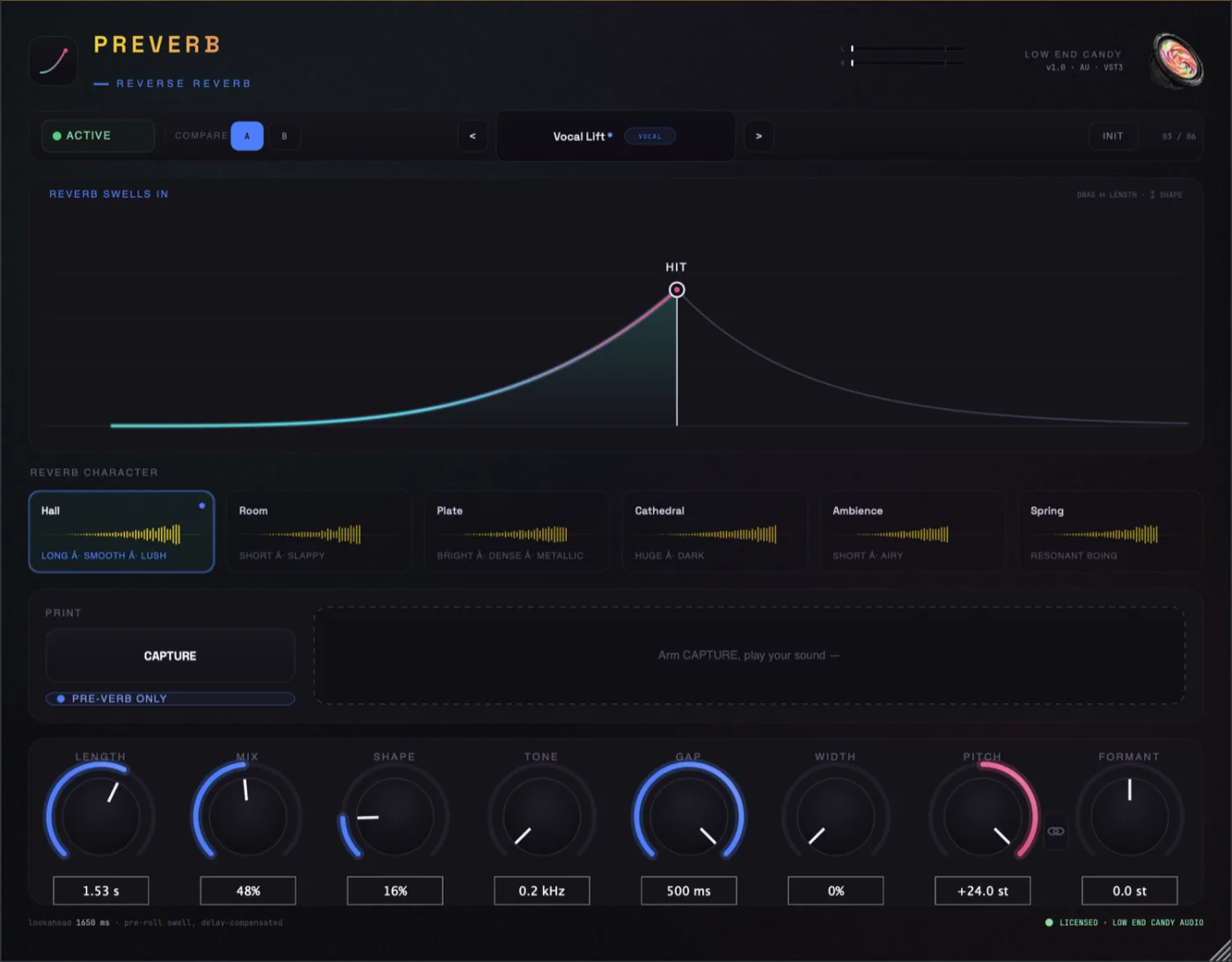
A real-time insert built only for the swell. It has six reverb characters (Hall, Room, Plate, Cathedral, Ambience, Spring), each with its own swell envelope and tone, and a seventh Custom slot that plays any impulse response you own backwards. Pitch and formant controls shape the swell. Capture prints it to a WAV you drag into your session, and Target lets you pick which transient in a drum loop gets the swell while the rest stays dry. VST3 and AU on Mac and Windows; there is no AAX, so Pro Tools needs a VST3 wrapper. No license key, nothing to activate, and a 14-day money-back guarantee.
Good for: swells on every build and transition, in any DAW, while the part is still changing. Downside: it does one job. If you want a general reverb, look at Blackhole or Crystalline.
UnitedPlugins Mirror, about $69
UnitedPlugins calls its approach "reverse negative delay": the plugin reports latency, and the DAW's delay compensation plays the reversed effect before your transient. You can add reverb and filtering to the sound before it is reversed, which gives a different signal path from reversing a reverb tail.
Good for: producers who want the DAW to handle the timing and like shaping the sound before the reverse.
Eventide Blackhole, $99 list
Eventide's Blackhole is a big ambient reverb. Its Gravity control, turned into negative values, folds the tail backwards into a swell. Reverse is one mode inside a deep sound-design reverb with 50+ presets.
Good for: a reverb you will use for everything, with reverse as one of its colours. Downside: $99 list for a full reverb when the swell may be the only part you need.
Baby Audio Crystalline, $99 list
Baby Audio's Crystalline is an everyday algorithmic reverb with a Reverse switch next to freeze, shimmer and modulation.
Good for: a characterful daily-driver reverb where reverse is a bonus. Downside: the same as Blackhole: you are buying a whole reverb for one switch.
RVRSE, free
Free and open source, VST3, AU and CLAP. It builds a reversed swoosh into a transient from a one-shot impact sample.
Good for: risers from one-shot impacts on zero budget. Downside: it does not reverse the reverb on a part you already have.
Reason Studios RewindVerb
Real-time reverse reverb, but as a Rack Extension, so it runs only inside Reason.
Good for: Reason users. Downside: nobody else can load it.
The manual method, free
Reverse the audio, add any reverb, bounce, reverse again and line up the tail so it leads into the transient. Every DAW can do it.
Good for: a one-off, or a specific reverb you love. Downside: every change to the part means doing the whole chain again.
What do producers use reverse reverb for?
- Risers and transitions. A swell into a drop or a new section. This is where a real-time insert saves the most time, because a track has many of them.
- Vocal lead-ins. A short swell in front of a vocal phrase. Shorter lengths and a cleaner character (Room or Plate) usually sit better than a huge Cathedral wash.
- Snare and crash swells. A reversed tail into the transient for extra weight. A creative reverb like Blackhole or Crystalline gives these more texture.
- Drones and sound design. Stretching the effect into a pad or texture. That is Blackhole and Crystalline territory.
How to choose
- One swell, one session: the manual method in Ableton Live, FL Studio or Logic Pro.
- Free, from one-shot impacts: RVRSE.
- A reverb for everything that also reverses: Blackhole or Crystalline.
- You want the DAW to time a pre-echo for you: Mirror.
- Swells on every transition, in any DAW, still editable: Preverb.
- Only use Reason: RewindVerb.